
"An ingest is where your video enters the cloud - the gateway to professional streaming."
In the world of live streaming, the term "ingest" refers to the process and endpoint where video content enters a streaming system. Understanding ingests is fundamental to building a professional streaming workflow, whether you're a solo content creator or managing a multi-camera production.
What Exactly is an Ingest?
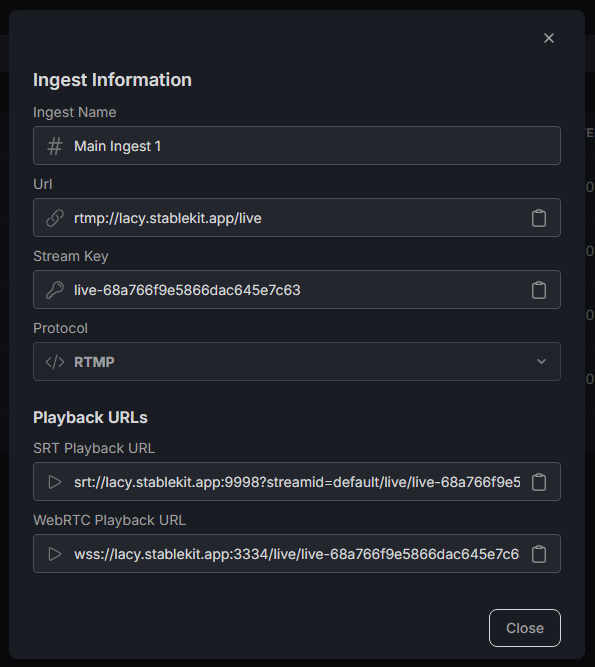
An ingest (short for "ingestion point" or "ingest endpoint") is a server URL and stream key combination that accepts incoming video streams. When you configure OBS or any streaming software to send video somewhere, you're connecting to an ingest endpoint.
Think of an ingest like a mailbox - it's a specific address where your video "mail" gets delivered. The ingest receives your video stream, processes it, and routes it to wherever it needs to go (your cloud server, streaming platforms, or recording storage).
Components of an Ingest
Every ingest in StableKit consists of:
- Ingest URL: The server address where you send your video (e.g., rtmp://ingest.stablekit.app/live)
- Stream Key: A unique identifier that authenticates your stream and routes it correctly
- Protocol: The method used to transmit video (RTMP, SRT, WebRTC, or WHIP)
How Ingests Improve Production Quality
1. Multiple Video Sources

With multiple ingests, you can accept video from different sources simultaneously. This enables professional multi-camera setups where each camera sends to its own ingest, and your cloud server combines them into a polished broadcast.
Use cases include: gaming streams with facecam separation, interviews with multiple participants, and event coverage with switching between angles.
2. Remote Guest Integration
Collaborating with remote guests? Each guest can send their video feed to a dedicated ingest. Your cloud server receives all feeds and lets you produce a professional show with multiple participants, without anyone needing to be in the same location.
3. Backup and Redundancy
Professional broadcasters often use multiple ingests for the same content as a backup. If one connection fails, the other continues without interruption. This redundancy is essential for important broadcasts where downtime isn't acceptable.
4. Protocol Flexibility
Different situations call for different streaming protocols. StableKit ingests support multiple protocols:
- RTMP: Universal compatibility, works everywhere
- SRT: Better for unstable networks, lower latency
- WebRTC: Ultra-low latency for interactive content
- WHIP: Modern browser-based streaming
You can create different ingests with different protocols based on what works best for each video source.
Using Ingests in StableKit
Creating an Ingest
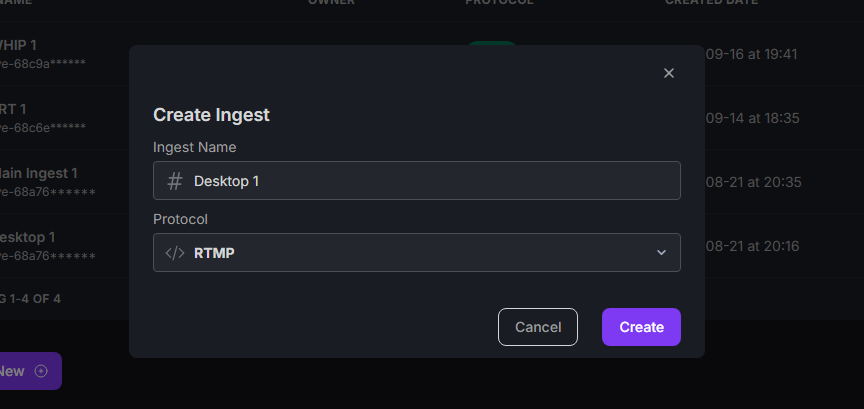
In StableKit, creating an ingest is straightforward:
- Navigate to the ingest section
- Click "Create New"
- Choose your preferred protocol
- Give your ingest a descriptive name
- Copy the ingest URL and stream key to your streaming software after creation
Viewing Ingest Output in OBS
Once video is flowing into your ingest, you can view it as a source in OBS or any media player. StableKit provides playback URLs for each ingest, allowing you to:
- Monitor incoming feeds in your production software
- Use ingest outputs as sources in your scene layouts
- Create picture-in-picture effects with multiple ingests
- Preview feeds before adding them to your live broadcast
Ingest Best Practices
- Name ingests clearly: Use descriptive names like "Main Camera," "Guest Feed," or "Screen Capture"
- Keep stream keys secure: Anyone with your stream key can send video to your ingest
- Match protocols to needs: Use SRT for unreliable networks, RTMP for compatibility
- Test before going live: Always verify your ingest is receiving video before important broadcasts
Conclusion
Ingests are the foundation of cloud-based streaming workflows. By understanding how to create, configure, and use ingests effectively, you unlock the ability to build sophisticated multi-source productions, collaborate with remote guests, and achieve broadcast-quality reliability. StableKit makes managing ingests simple while giving you the flexibility professionals need.