
"Collaboration made simple - share your ingests securely with the creators you trust."
Collaborative streaming is more popular than ever. Whether you're hosting a podcast with a remote co-host, running a multi-streamer event, or letting a producer manage your feeds, StableKit's ingest sharing feature makes it easy to work together. This guide explains how to share ingests with other creators and what to expect when managing shared access.
Why Share Ingests?
There are many scenarios where sharing an ingest with another creator makes sense:
- Remote guests: Give a guest their own ingest URL to send their camera feed
- Production teams: Let producers or technical directors access your ingests for show management
- Co-streaming partners: Allow regular collaborators to contribute to your broadcasts
- Event management: Enable multiple contributors to send feeds for a combined broadcast
How to Share an Ingest
Sharing an ingest in StableKit is straightforward:
- Navigate to the ingest you want to share in your dashboard
- Click on the settings option for that ingest
- Look for the "Share Ingest" option
- Enter the username of the StableKit user you want to share with
- Confirm the share
What Shared Users Can Do
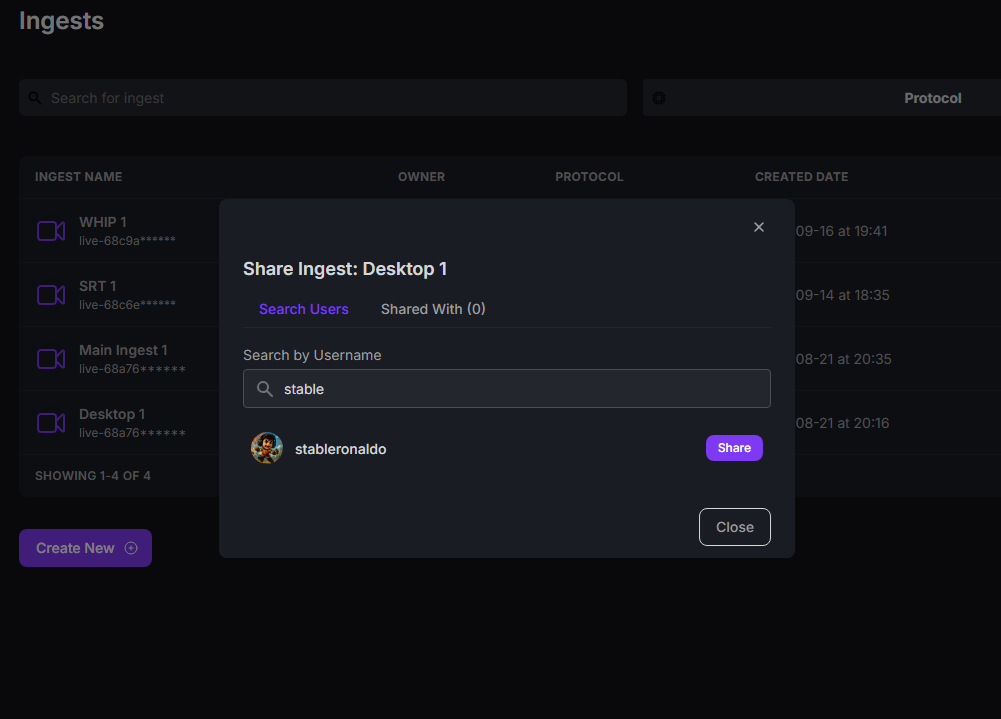
When you share an ingest with another creator, they gain access to view and use that ingest's connection details. They can see the ingest URL and stream key needed to send their video feed.
The shared ingest will appear in their StableKit dashboard, clearly marked as shared from your account.
Shared users can typically:
- View the ingest URL and stream key
- Send video to the ingest from their streaming software
- See basic status information about the ingest
Shared users cannot:
- Delete or modify the ingest settings
- Share the ingest with additional users
- Access your other ingests or server settings
- View your billing or subscription information
Managing Shared Access
As the ingest owner, you maintain full control over shared access:
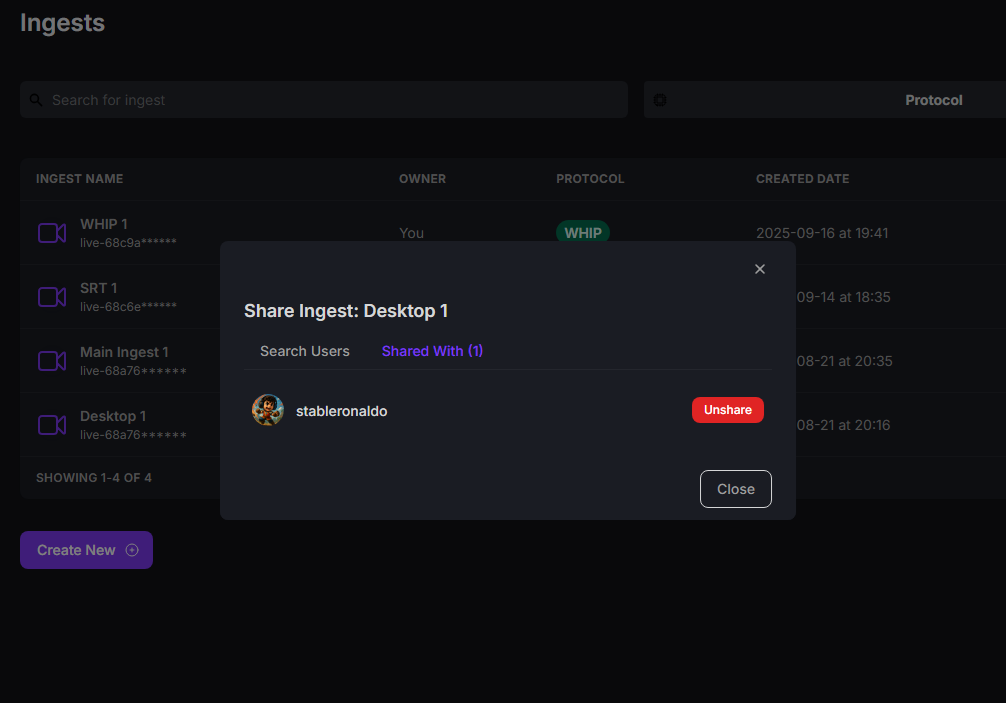
- View a list of all users who have access to your ingest
- Remove access from any user at any time
- See when access was granted
What Happens When You Unshare an Ingest
When you remove a user's access to a shared ingest (unsharing), the following occurs:
Immediate Effects
- Access revoked instantly: The user can no longer see the ingest in their dashboard
- Stream key hidden: They lose visibility of the stream key and ingest URL
- No notification sent: The user is not automatically notified (you should inform them separately if needed)
Active Streams
If the user was actively streaming to your ingest when access is revoked, their stream will continue until they stop it. However, they won't be able to reconnect if they disconnect or restart their stream, since they no longer have access to the credentials.
Security Consideration
Keep in mind that if someone previously had access to your stream key, they may have saved it. If you're concerned about unauthorized access after unsharing, the safest approach is to delete the ingest entirely and create a new one with fresh credentials. This ensures no one can connect using old stream keys.
Best Practices for Sharing Ingests
- Share with trusted users only: Only share ingests with people you trust, as they'll have access to send video to your production
- Use dedicated ingests for guests: Create separate ingests for each guest rather than sharing your main ingest
- Review shared access regularly: Periodically check who has access to your ingests and remove anyone who no longer needs it
- Communicate clearly: Let collaborators know when you're sharing or unsharing access
- Rotate credentials after collaborations: For one-time collaborations, consider deleting the shared ingest afterward and creating a new one for future use
Conclusion
StableKit's ingest sharing feature makes collaborative streaming simple and secure. By understanding how sharing works, what shared users can access, and how unsharing affects them, you can confidently collaborate with other creators while maintaining control over your streaming infrastructure. Whether you're hosting regular co-streams or one-time events, ingest sharing gives you the flexibility to work with others on your terms.