
"Choosing the right protocol is the foundation of a reliable streaming workflow."
StableKit supports four streaming protocols: RTMP, SRT, WebRTC, and WHIP. Each has its strengths and ideal use cases. This guide will help you understand the differences, choose the right protocol for your needs, and configure each one correctly.
Quick Comparison
| Protocol | Latency | Network Tolerance | Best For |
|---|---|---|---|
| RTMP | Medium (2-5s) | Low | General streaming, compatibility |
| SRT | Low (1-3s) | High | Unreliable networks, remote locations |
| WebRTC | Ultra-low (<1s) | Medium | Interactive streams, real-time |
| WHIP | Ultra-low (<1s) | Medium | Browser-based streaming |
Our Recommendation: For most users, SRT offers the best balance of quality, reliability, and latency. Use RTMP if you need maximum compatibility, and WebRTC/WHIP for interactive or browser-based scenarios.
RTMP (Real-Time Messaging Protocol)
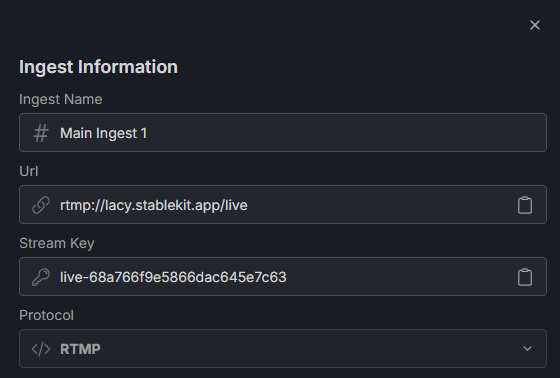
Overview: RTMP is the original streaming protocol, developed by Adobe. It's been the industry standard for over a decade and works with virtually every streaming platform and software.
Latency: Typically 2-5 seconds end-to-end, making it suitable for most broadcast scenarios where real-time interaction isn't critical.
Pros
- Universal compatibility - works everywhere
- Simple to configure
- Supported by all major streaming software
- Well-documented and understood
Cons
- Higher latency than modern alternatives
- Struggles on unstable networks (no packet recovery)
- Uses TCP, which can cause buffering issues
When to Use RTMP
- When you need guaranteed compatibility
- On stable, reliable network connections
- For traditional broadcast workflows
- When using older hardware or software
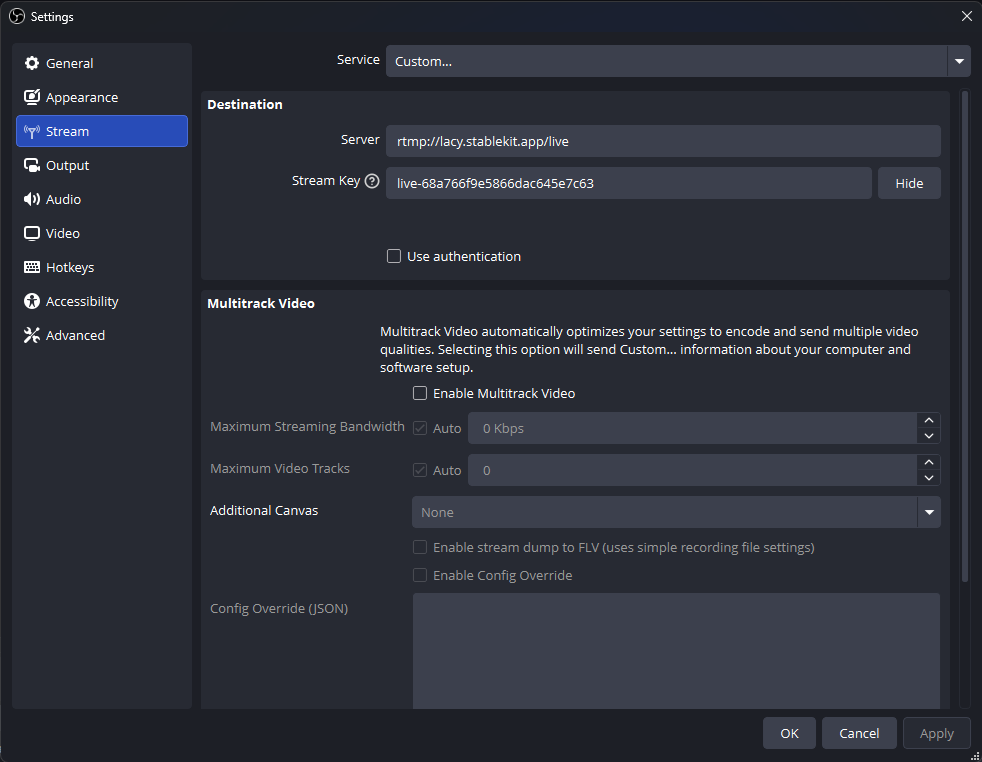
Configuring RTMP in OBS
- Open OBS and go to Settings > Stream
- Set Service to "Custom..."
- Enter your StableKit RTMP Server URL (e.g.,
rtmp://your-name.stablekit.app/live) - Enter your Stream Key
- Click Apply
SRT (Secure Reliable Transport)
Overview: SRT is a modern, open-source protocol designed specifically for live video transport over unpredictable networks. It was developed by Haivision and has become the go-to choice for professional broadcasters.
Pros
- Built-in packet recovery handles network issues gracefully
- Lower latency than RTMP
- AES encryption for secure streams
- Adjusts dynamically to network conditions
- Works well over the public internet
Cons
- Slightly more complex to configure
- Not as universally supported as RTMP (though growing rapidly)
- Requires proper latency tuning for optimal results
When to Use SRT
- Streaming from locations with unstable internet
- Remote broadcasts (events, outdoor locations)
- When you need lower latency than RTMP
- For professional or broadcast-quality requirements
- As your default choice if your software supports it
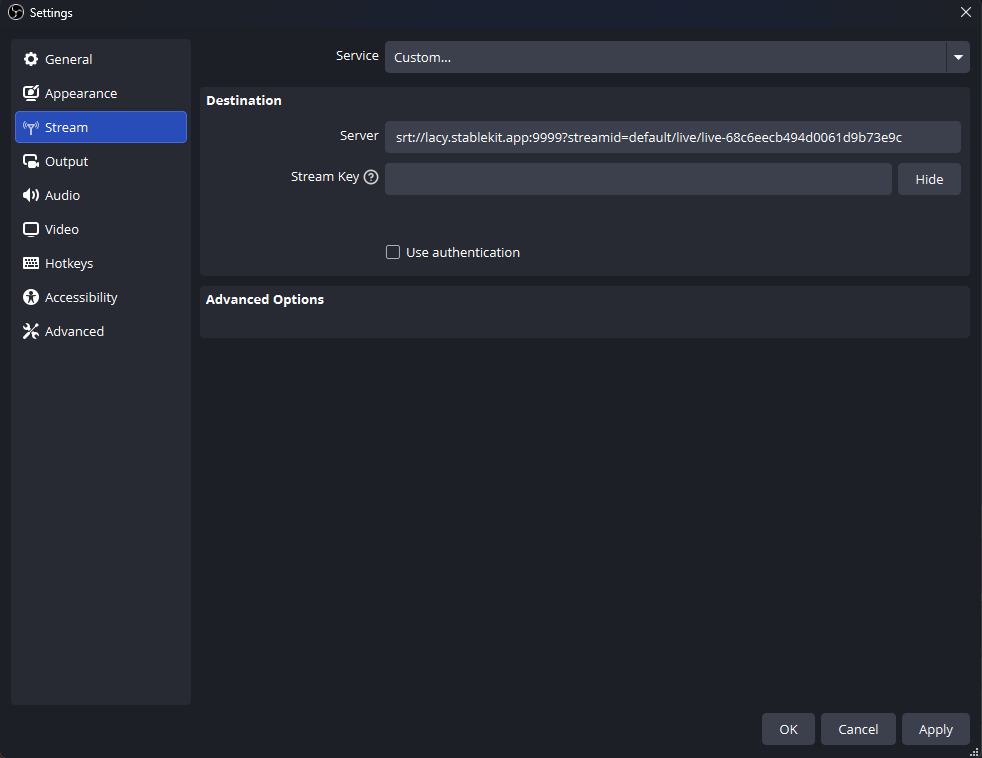
Configuring SRT in OBS
- Open OBS and go to Settings > Stream
- Set Service to "Custom..."
- Enter your StableKit SRT URL in caller mode format:
srt://your-name.stablekit.app:9999?streamid=default/live/your-stream-key&latency=200000 - Leave Stream Key empty (it's included in the URL)
- Click Apply
Tip: The latency parameter (in microseconds) affects how much buffer SRT uses for packet recovery. Start with 200000 (200ms) and increase if you experience issues on unstable networks.
WebRTC (Web Real-Time Communication)
Overview: WebRTC is a browser-native protocol designed for real-time communication. It offers the lowest possible latency, making it ideal for interactive streaming scenarios.
Pros
- Sub-second latency (often under 500ms)
- Built into modern web browsers
- Great for two-way communication
- Handles NAT traversal automatically
Cons
- More complex infrastructure requirements
- Higher bandwidth usage
- Limited software support outside browsers
- Not ideal for long-duration broadcasts
When to Use WebRTC
- Interactive streams with real-time audience participation
- Live auctions, Q&A sessions, or gaming streams where latency matters
- Browser-based streaming setups
- Video conferencing integrations
Configuring WebRTC
WebRTC configuration varies depending on your setup. In StableKit, WebRTC ingests provide a browser-based interface where you can start streaming directly without additional software. Check your ingest details for the WebRTC viewer/publisher URL.
WHIP (WebRTC-HTTP Ingestion Protocol)
Overview: WHIP is a newer standard that simplifies WebRTC streaming by providing a standardized HTTP-based signaling mechanism. It brings WebRTC's low latency to traditional streaming workflows.
Pros
- WebRTC latency with simpler configuration
- Standardized protocol (not vendor-specific)
- Growing OBS and software support
- Works with standard streaming interfaces
Cons
- Relatively new, less widespread support
- Requires WHIP-compatible endpoints
When to Use WHIP
- When you want WebRTC latency with OBS
- For modern, low-latency streaming setups
- When your workflow supports WHIP endpoints
Configuring WHIP in OBS
- Open OBS (version 30.0 or later recommended)
- Go to Settings > Stream
- Set Service to "WHIP"
- Enter your StableKit WHIP Server URL
- Enter your Bearer Token (stream key)
- Click Apply
Viewing Ingest Playback in OBS
Once video is flowing to your ingest, you may want to view the playback as a source in OBS (for monitoring or using as a video source in your production).
Adding an Ingest as a Media Source
- In OBS, click the + button in the Sources panel
- Select "Media Source" (or "VLC Video Source" if installed)
- Check "Local File" OFF
- Enter the playback URL from your StableKit ingest
- Enable "Restart playback when source becomes active"
- Click OK
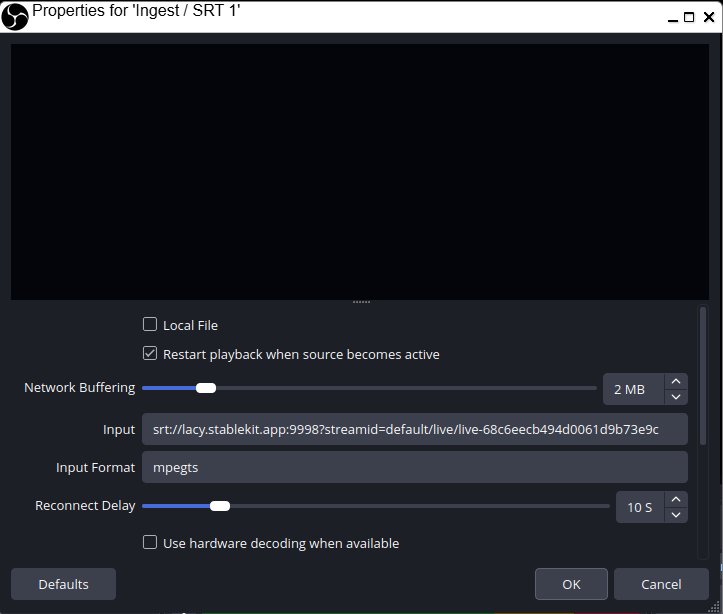
Note: Stablekit provides a SRT and WebRTC playback URL. OBS only supports the SRT protocol for playback.
Choosing the Right Protocol: Summary
- Start with SRT - It's the best all-around choice for most streaming scenarios
- Use RTMP when you need maximum compatibility or are working with legacy systems
- Choose WebRTC/WHIP when sub-second latency is essential for your use case
- Test your setup before important broadcasts to ensure the protocol works well with your network
Conclusion
Understanding streaming protocols empowers you to build more reliable and efficient streaming workflows. While RTMP remains the universal standard, SRT offers significant advantages for most modern use cases. WebRTC and WHIP unlock ultra-low latency for interactive scenarios. StableKit's support for all four protocols gives you the flexibility to choose the right tool for every situation.